

A CCTV storage calculator takes the guesswork out of figuring out how much hard drive space your NVR or DVR actually needs. For instance, if you want to know how much data 4 cameras will chew through in a month, or if you’re trying to figure out the exact storage capacity required to hold a full month of footage, this tool does the math for you. That way, you can easily compare it against your existing setup and decide whether you need to add more hard drives or scale back.
Pro CCTV Storage & Bandwidth Calculator
Configure basic and advanced parameters to get precise system estimates.
⚙️ ADVANCED OPTIONAL INPUTS Click to expand
Estimation Output
📊 How to Calculate Your CCTV Requirements (Step-by-Step) Using CCTV Storage Calculator
Follow these four simple engineering steps to precisely blueprint your network infrastructure and NVR drive array capacity:
• Total Bandwidth (Mbps): The throughput capacity your core network switch must support.
• Required Storage (TB): The net size of the surveillance hard drive arrays you need to load into your NVR.
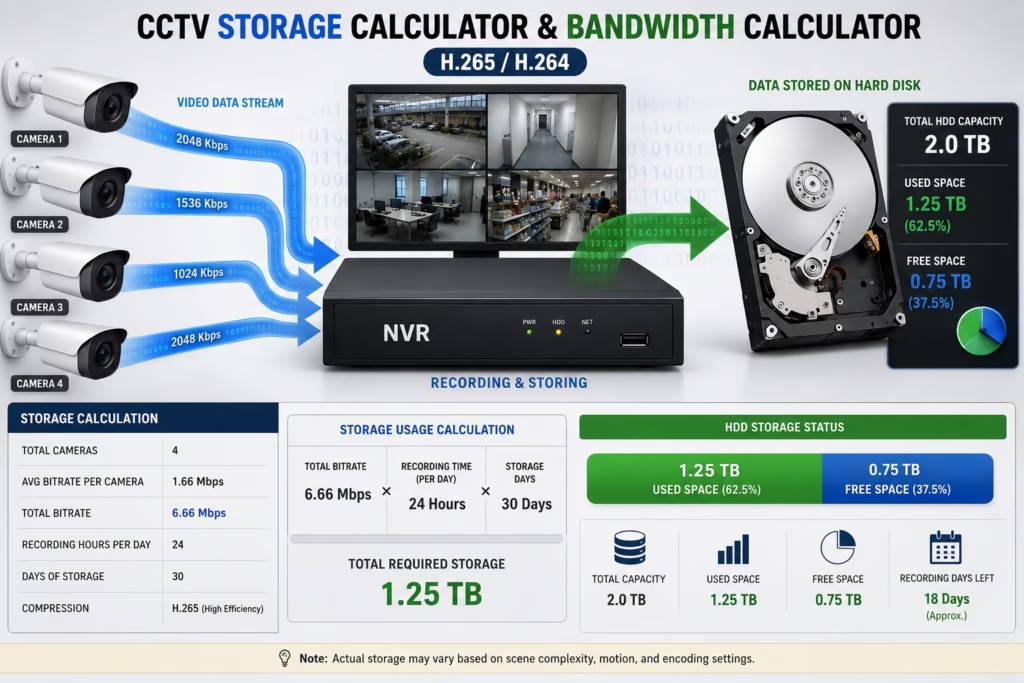
Parameters Used in CCTV Storage Calculator
| Setting | Description |
|---|---|
| Number of Cameras | Total installed cameras |
| Resolution | Camera resolution (1080P, 2K, 4MP, 5MP, 8MP) |
| Compression | H.264 or H.265 |
| FPS | Frame rate |
| Bitrate | Camera video bitrate |
| Recording Hours | Hours recorded each day |
| Storage Days | Number of days to retain footage |
| Motion Level | Scene activity |
| Audio Recording | Extra storage usage |
Recommended Hard Drive Sizes
| Cameras | Days | Suggested HDD |
|---|---|---|
| 2 | 30 | 500GB–1TB |
| 4 | 30 | 1TB |
| 8 | 30 | 2TB |
| 16 | 30 | 4TB |
| 32 | 30 | 8TB |
| 64 | 30 | 16TB+ |
Why Use a CCTV Storage Calculator?
Storage is one of the most important parts of every surveillance system.
Buying a hard drive that's too small may cause recordings to overwrite quickly, while purchasing an oversized drive increases unnecessary costs.
Our calculator estimates storage based on:
- Number of cameras
- Resolution
- H.264 / H.265 compression
- Bitrate
- Frame rate
- Recording hours
- Motion activity
- Recording days
Engineered Hardware Recommendations
Since security cameras run 24/7, it only makes sense that the hard drive inside your NVR or DVR has to work around the clock too. You can't just throw a standard desktop drive in there; you need a surveillance-grade HDD that’s built for continuous, 24/7/365 write cycles. To help you pick the right one, we’ve put together a list of the best hard drives for the job right here.
1. Enterprise Storage (Surveillance-Grade HDDs)
- Western Digital Purple (AllFrame Technology): Specifically tuned for high-ambient, continuous write environments. For configurations running more than 8 channels at 4MP+, we strictly recommend the WD Purple Pro arrays to mitigate write-head vibration.
- Seagate SkyHawk AI: Optimized for NVR infrastructure utilizing concurrent edge analytics, offering integrated ImagePerfect firmware to prevent caching delays.
2. High-Density Power Over Ethernet (PoE) Infrastructure
- Gigabit Layer 2 Managed PoE+ Switches: Standard 10/100 switches introduce a hard buffer limit when running multiple 4K H.265 streams at 25FPS+. Utilize dedicated gigabit-uplink hardware to maintain strict packet routing and eliminate network-induced stream jitter.
See this: RTSP Url Generator
How to Manually Calculate CCTV Bandwidth & Storage
Now, the CCTV storage calculator we shared above does all the heavy lifting for you in a single click—even taking advanced variables like frame rate (FPS) and encoding into account so you don't have to crunch the numbers yourself. That said, if you're curious about how the magic happens behind the scenes, we've broken down exactly how you can calculate your hard drive storage manually too.
The universal framework derived from the EN 62676-4 international standard defines the operational data footprint via the following deterministic model:
Bitrate per Camera (Kbps)} x Number of Cameras x Retention Time (Seconds)} = Total Data Footprint (BitsTo systematically convert this raw bit calculation into standard commercial storage units (Terabytes), apply the systematic byte-boundary scale:
Storage (TB) = (Total Bits)/(8 x 1024 x 1024 x 1024 x 1024)
The Bitrate Constant Multiplier Table
To build baseline profiles for calculations without live device diagnostics, security deployment engineers utilize these standard fixed bitrates based on conservative industry targets:
| Resolution Profile | H.264 Codec Baseline (20 FPS) | Advanced H.265 Codec (20 FPS) | High-Efficiency Scene Savings |
| 1080p (2 Megapixel) | 2048 Kbps | 1024 Kbps | approx 50% Storage Reduction |
| 4MP (2K QHD Single) | 4096 Kbps | 2048 Kbps | approx 50% Storage Reduction |
| 8MP (4K Ultra HD) | 8192 Kbps | 4096 Kbps | approx 50% Storage Reduction |
Final Verdict
Never cut corners on your surveillance infrastructure. Calculating your storage and bandwidth requirements is only half the battle—deploying the right hardware to handle that load is what keeps your network stable. Make sure you are choosing dedicated, surveillance-grade HDDs like WD Purple or Seagate SkyHawk that are engineered to withstand non-stop 24/7 write cycles. Standard desktop drives will fail under this pressure. Pair your storage with a solid Gigabit PoE+ switch to avoid stream stutter, and your security network will run flawlessly for years.
FAQs
How many days will a 4TB hard drive record with 4 IP cameras?
On a standard corporate footprint running continuous 24/7 recording with 4 crisp 4MP (2K) cameras encoded at 20 FPS via the H.265 codec (2048Kbps individual bitrate allowance), a 4TB surveillance drive will last for exactly 11.5 operational days. Shifting the operational profile to motion-detection-only can scale this active data window up to 30+ calendar days depending on localized site activity.
What internet speed or bandwidth do I need for a 4K security camera?
To get actual, crystal-clear 4K quality without stuttering, you’ll want to allocate between 4 Mbps and 6 Mbps per camera (assuming you're using H.265 encoding). If you choke the bandwidth below that, your video will get blocky, pixelated, and drop frames the second something actually moves in front of the lens.
Can I just use a regular desktop hard drive inside my NVR?
Honestly? Don't do it. Regular PC hard drives are built for short bursts of reading and writing, then going to sleep. NVRs are a completely different beast—they force a drive to write heavy high-def video streams 24/7/365 without a single second of downtime. A standard desktop drive will overheat, corrupt your data, and burn out within a few months. Always stick to dedicated surveillance drives like WD Purple or Seagate SkyHawk. They're built for the grind.
Does H.265 reduce storage?
Yes. H.265 usually reduces storage requirements by 30–50% compared with H.264 while maintaining similar image quality.