
You can find information about popular Dahua CCTV software, including SmartPSS Lite, ConfigTool, Smart Player, DSS software, and DMSS, along with guidance on choosing the right application.

For current software packages and official resources, Dahua maintains a dedicated Download Center where software can be searched and downloaded.
Important: Software availability, versions, operating-system support, and download links can change. Always verify the software version and compatibility before installing it.
Dahua Download Softwares, Tools & Utilities
Download official Dahua VMS software, network configuration tools, player utilities, and mobile monitoring applications for Dahua DVRs, NVRs, and IP cameras. Dahua software is designed for different surveillance-related tasks. Some applications are intended for daily CCTV monitoring, while others are used for network configuration, playback, device management, or larger surveillance deployments.If you are searching for Dahua software downloads, the most useful applications to know about include:
| Software | Main Purpose | Typical Use | Download |
|---|---|---|---|
| SmartPSS Lite | CCTV management | DVR, NVR, IP cameras management | Download |
| ConfigTool | Device configuration | Finding & configuring Dahua devices | Download |
| Smart Player | Video playback | Playing recorded surveillance videos | Download |
| DSS Express / Pro | Enterprise VMS | Larger or advanced surveillance systems | Download |
| DMSS App | Mobile monitoring | Remote CCTV viewing on smartphones | Download |
| Dahua ToolBox | Utilities Hub | Dahua device & system management tools | Download |
All Dahua Software Cards
SmartPSS Lite
Dahua ConfigTool
Smart Player
DMSS Mobile App
Dahua DSS Platform
Dahua ToolBox
Which Dahua Software Do You Need?
- PC Video Monitoring: SmartPSS Lite
- IP Camera & NVR Network Setup: ConfigTool
- Playing Exported .DAV Videos: Smart Player
- Enterprise Multi-site Management: DSS Platform
- Mobile Remote View: DMSS Mobile Application
- Tool Management & Utilities Hub: Dahua ToolBox
Tips Before Installing Dahua Software
Ensure maximum compatibility between your computer OS and Dahua surveillance hardware:
- Run ConfigTool and SmartPSS Lite as Administrator on Windows to avoid local firewall network scanning issues.
- Verify device IP ranges before initializing cameras using ConfigTool.
- Keep exported video backup files in their original format (.dav) to review watermarks using Smart Player.
- Backup your Dahua device configurations before initiating remote firmware upgrades.
Dahua Download SmartPSS Lite
For many Dahua users, SmartPSS Lite is the most relevant desktop application.
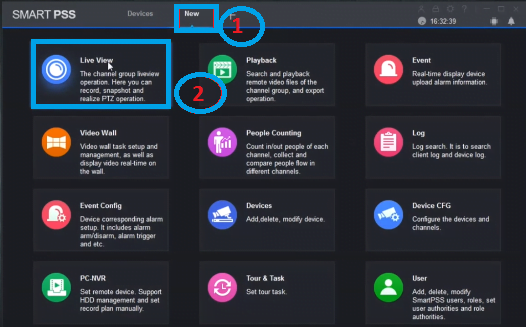
It is intended for managing supported Dahua surveillance devices from a computer and can bring multiple cameras and recorders into one interface. Instead of opening each device separately, you can add the supported devices to the software and work with them from the same application.
Depending on the equipment and version, typical functions include live viewing, playback, device management, and other surveillance-related operations.
This makes SmartPSS Lite useful for a home CCTV installation as well as a small business where several cameras need to be monitored from one PC. You can download SmartPSS Lite from the link above.
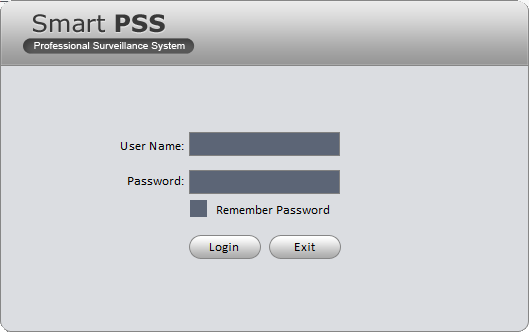
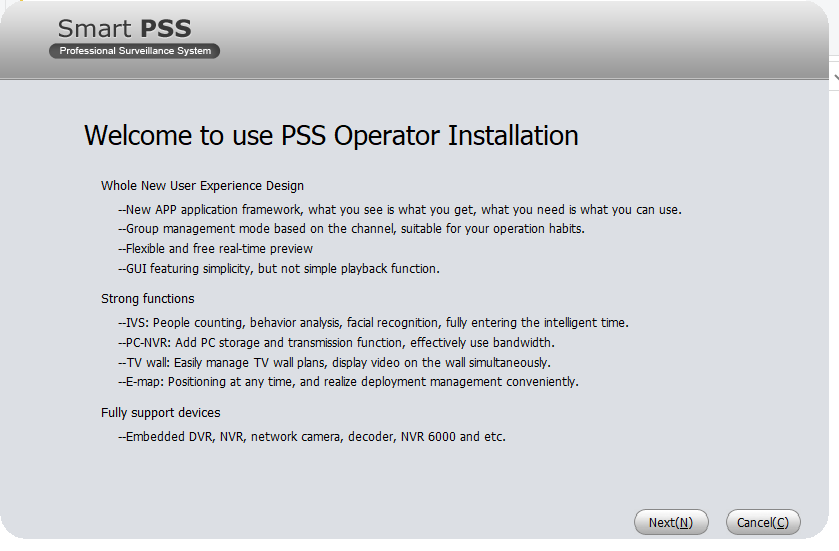
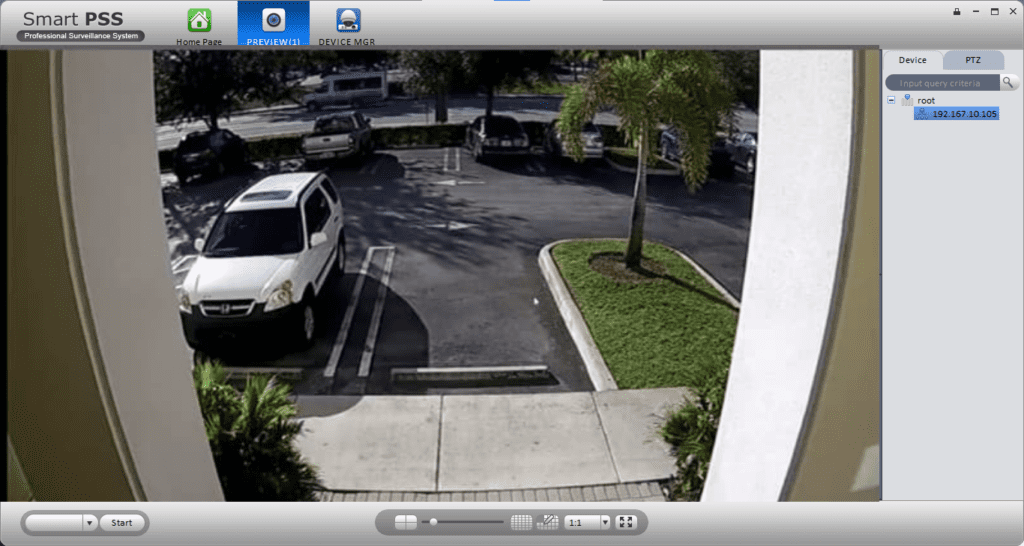
What can SmartPSS Lite do?
The exact features depend on the connected Dahua products, but the software can be used for tasks such as:
- Live viewing of CCTV cameras
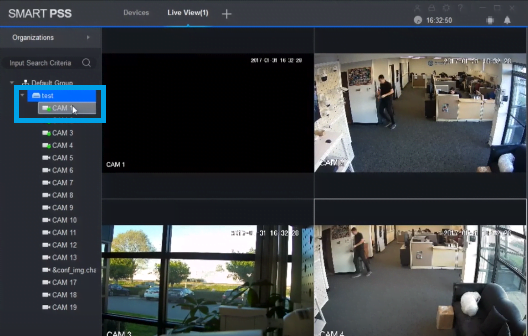
- Viewing multiple channels at once
- Accessing recorded footage
- Managing supported DVRs
- Managing supported NVRs
- Working with IP cameras
- Organizing connected surveillance devices
- Handling supported access-control and intercom products
If you only have one camera and rarely need to access it from a computer, installing a large management application may be unnecessary. For a multi-camera setup, however, a desktop client becomes much more useful.
SmartPSS vs SmartPSS Lite
This is one of the most common points of confusion when downloading Dahua software.
Older versions of SmartPSS can still be found on third-party websites, old installation discs, and archived software pages. That does not necessarily mean they are the version you should install today.
Dahua has published notices regarding the discontinuation of services for certain older SmartPSS 2.0 versions and has recommended users move to SmartPSS Lite.
So, when someone searches for Dahua SmartPSS download, it is worth checking the current SmartPSS Lite option before installing an old SmartPSS package simply because it appears first in a search result.
There is another reason to be careful with old CCTV software: an old application may have been designed around an older firmware version, an older operating system, or services that are no longer available.
For an existing installation that has been working for years, the situation can be different. In that case, replacing software without checking the recorder and firmware first may create unnecessary problems.
Dahua ConfigTool Download
Dahua ConfigTool serves a completely different purpose from SmartPSS Lite.
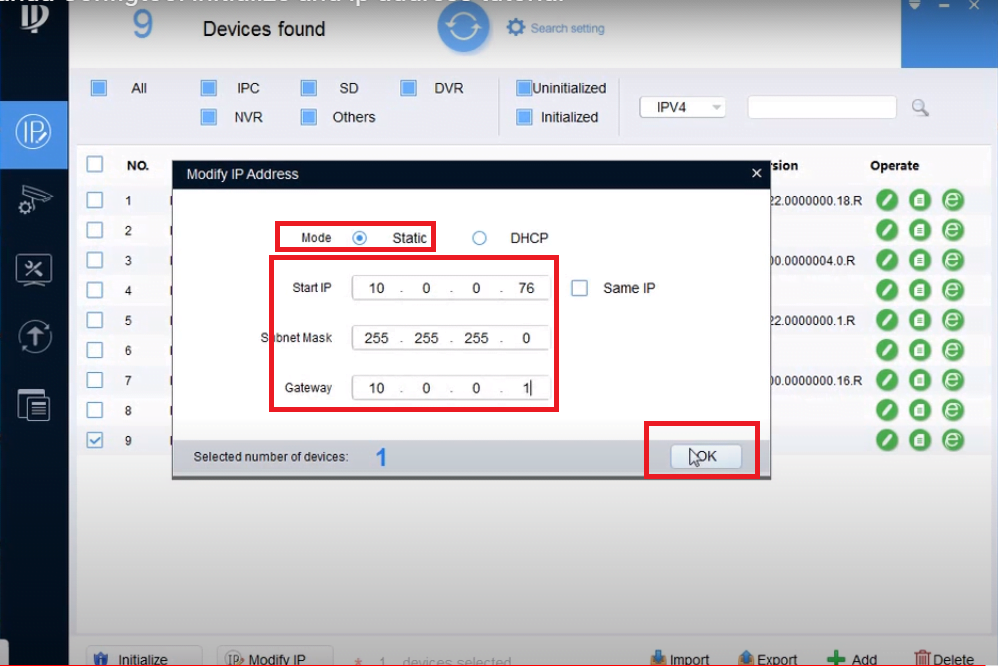
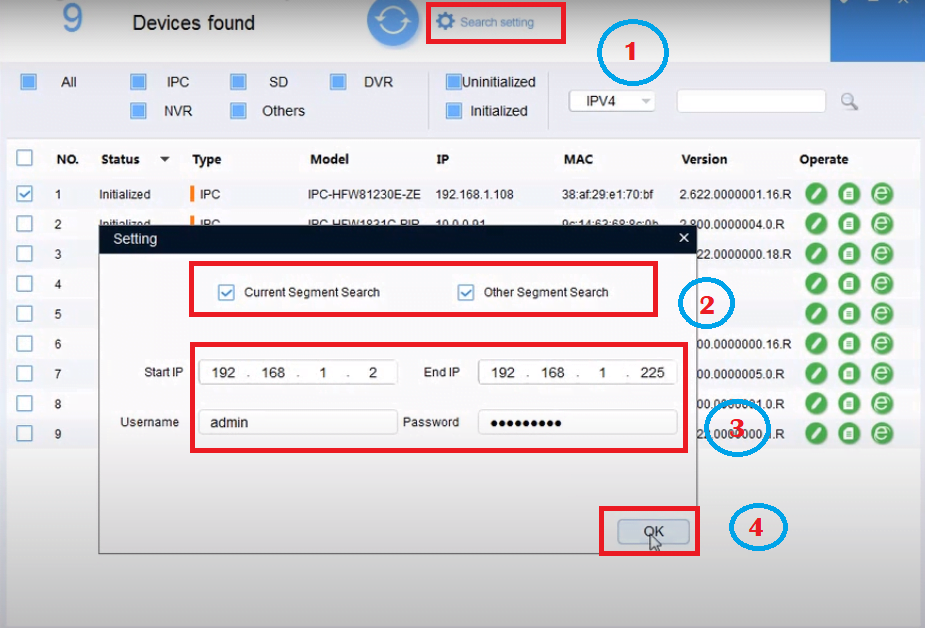
It is particularly useful during installation and network configuration. When a Dahua IP camera or another compatible network device is connected to a local network, ConfigTool can help identify the device and perform supported configuration tasks.
This is especially handy for installers.
Imagine that a new Dahua camera has been connected to a switch, but you do not know which IP address it received. Opening the normal CCTV viewing software may not solve the problem. A configuration utility is much more appropriate for this type of job.
What is Dahua ConfigTool used for?
Depending on the device and software version, ConfigTool can be used for tasks such as:
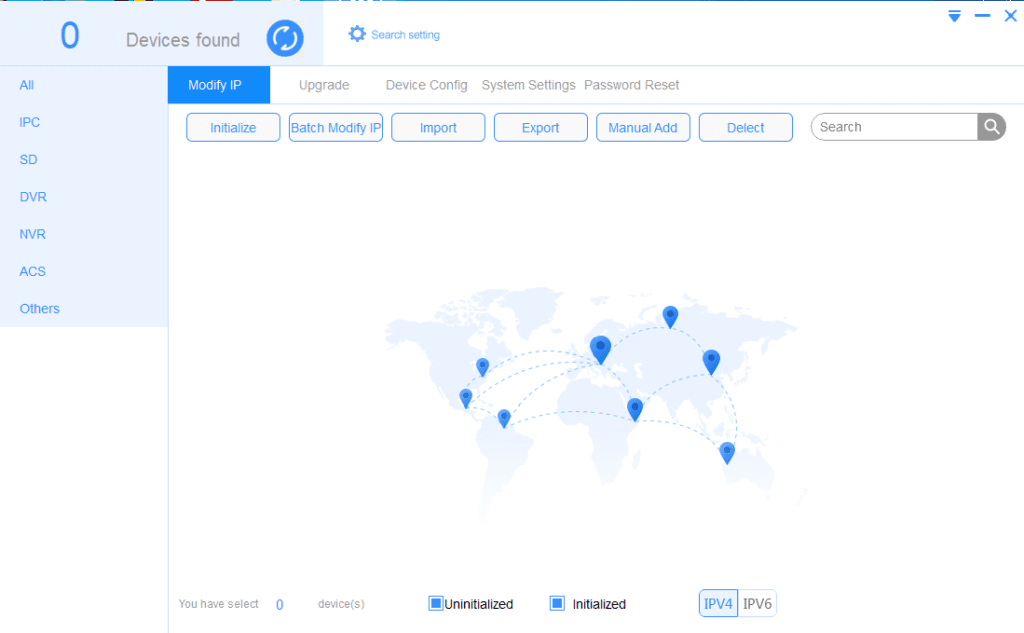
- Discovering Dahua devices on a local network
- Viewing device network information
- Configuring IP-related settings
- Accessing supported device configuration options
- Performing certain supported update procedures
- Working with compatible Dahua cameras and recorders
ConfigTool is therefore worth keeping available if you regularly install or troubleshoot Dahua IP cameras.
Dahua Download Smart Player
Recorded CCTV footage is sometimes exported from a recorder in a format that does not behave like an ordinary MP4 file.
That is where a dedicated player can be useful.
Dahua Smart Player is intended for playback of supported Dahua video files and can be useful when reviewing exported surveillance footage on a computer.
For example, if a DVR recording has been copied to a USB drive and the resulting file does not open normally in a standard media player, a Dahua-compatible playback utility may be the better option.
The exact file formats supported depend on the player version and the way the footage was exported.
Dahua Download Toolbox
Dahua users may also come across Dahua Toolbox when searching for installation and configuration utilities.
A toolbox is useful when you need one of the smaller utilities associated with Dahua products rather than a full CCTV management application.
Because Dahua’s software catalog changes over time, the best place to confirm whether a particular Toolbox package or utility is currently available is the official Dahua software download area.
Dahua Download DMSS
DMSS is different from the Windows applications discussed above.
It is primarily associated with mobile access to Dahua surveillance systems.
If your goal is to check your cameras from a smartphone while away from the CCTV monitor, a mobile application makes much more sense than installing a desktop CMS.
A typical remote-viewing setup involves a compatible Dahua recorder or camera, network connectivity, the required account or device information, and the mobile application.
Remote access should always be configured carefully. Strong passwords, updated firmware, and sensible network security are important for any internet-connected CCTV system.
Dahua Download DSS Software
DSS is aimed at more advanced surveillance environments.
A small home installation does not usually need an enterprise-level management platform. A larger organization, however, may have multiple locations, many cameras, access-control equipment, or other security systems that need to be managed centrally.
Dahua provides several DSS-related solutions, including different products aimed at different deployment sizes and requirements.
For that reason, DSS should not be treated as simply another replacement for SmartPSS Lite. It belongs in a different category of CCTV management.
Dahua Download Software for Windows
Windows is still one of the most common platforms for CCTV monitoring, particularly in offices, shops, warehouses, schools, and security rooms.
If you need Dahua software for Windows, start by identifying the task rather than the software name.
For regular camera monitoring, SmartPSS Lite is the obvious application to investigate.
For network configuration, ConfigTool is more appropriate.
For playing exported surveillance footage, Smart Player may be useful.
For larger installations with more advanced management requirements, Dahua’s DSS products are designed for a different type of deployment.
Dahua Download CCTV Software for PC
A PC-based CCTV setup is useful when you want a larger screen, keyboard and mouse control, or continuous monitoring from a dedicated workstation.
Once the compatible Dahua software is installed, you can generally use the computer to access the functions supported by your camera or recorder.
A typical setup might look like this:
Dahua IP Cameras → Network Switch → NVR → Local Network → Windows PC
The PC does not necessarily need to be connected directly to every camera. If the cameras are already connected to a networked NVR, the desktop software (SmartPSS Lite) can often communicate with the recorder instead.
That distinction becomes important when setting up a larger system.
Dahua Download DVR Software
Dahua DVR owners commonly search for Dahua download DVR software when they want to view their recorder from a computer.
A compatible desktop application can make it easier to monitor the DVR without using the recorder’s local HDMI/VGA output.
Depending on the DVR and software, you may be able to:
- View live channels
- Review recordings
- Search recorded footage
- Manage connected devices
- Change supported settings
- Monitor several channels together
The DVR model matters here. Dahua has produced many recorder generations, and not every application works identically with every model.
Before installing a different client just because it is newer, check the recorder’s model number and firmware information.
Dahua NVR Software Download
The same principle applies to Dahua NVRs.
An NVR normally handles IP cameras over a network, so the desktop software(SmartPSS Lite) needs to communicate with the recorder and the devices connected to it.
For someone managing a few cameras at home, this may be straightforward. A business installation with several NVRs and dozens of cameras is a different story.
With a compatible Dahua NVR software setup, a PC can become a central monitoring station rather than requiring an operator to work directly at each recorder.
This is one of the reasons desktop CCTV software remains useful even when cameras already have web interfaces.
You may also see the phrase Dahua Download CMS software used in searches.
Dahua CMS Software Download
You may also see the phrase Dahua CMS software used in searches.
“CCTV CMS” generally refers to a central management system used to handle surveillance devices from one interface. Dahua has offered several software platforms over the years, so CMS should not be treated as the name of one single program.
For ordinary desktop monitoring, SmartPSS Lite may be enough.
For larger or more complicated installations, Dahua’s DSS family provides more extensive management capabilities.
The important thing is to match the software to the size and requirements of the CCTV installation instead of choosing a program simply because a website labels it as a “CMS.”
Dahua Download Camera Software
There is no single Dahua program that does everything.
A camera installer might use ConfigTool during the initial setup, SmartPSS Lite for day-to-day monitoring, and another utility for playing exported footage.
That is why the phrase Dahua download camera software can refer to several different programs.
For an IP camera installation, the basic workflow is often something like:
- Connect the camera to the network.
- Locate the camera using an appropriate configuration tool.
- Configure the network settings.
- Add the camera to the NVR or compatible management software.
- Test live video.
- Confirm recording.
- Test playback.
Once everything is working, you may never need ConfigTool again unless the network configuration changes.
Dahua Download Camera Viewer for PC
If your main requirement is simply to watch your Dahua cameras on a computer, you do not need to install every Dahua utility available.
A compatible desktop management application is generally the more convenient solution.
With a properly configured system, a PC can display several cameras at once. This is particularly useful for businesses where someone needs to keep an eye on entrances, parking areas, counters, warehouses, or other locations throughout the day.
The performance of the viewing experience will also depend on the number of cameras, resolution, frame rate, network connection, and the hardware in the computer.
Watching four 1080p cameras is a very different workload from displaying dozens of high-resolution streams simultaneously.
Dahua Download Software for Mac
Mac users often run into a different problem: not every Windows CCTV application has a macOS equivalent.
So if you are looking for Dahua software for Mac, do not assume that a Windows installer will work on macOS.
Check the software’s supported operating systems and the current Dahua documentation before downloading it.
For users who only need occasional remote access, a mobile solution such as DMSS may be more practical than setting up a dedicated desktop environment.
For someone who needs a permanent CCTV monitoring station on a Mac, however, compatibility should be checked before purchasing or changing hardware.
Which Dahua Software Should You Use?
The easiest way to choose is to start with the job you need to perform.
| What you need to do | Software to check |
| Watch Dahua cameras on a PC | SmartPSS Lite |
| Manage a supported DVR | SmartPSS Lite |
| Manage a supported NVR | SmartPSS Lite |
| Find a Dahua IP camera | ConfigTool |
| Change supported network settings | ConfigTool |
| Play exported Dahua footage | Smart Player |
| Monitor CCTV from a phone | DMSS |
| Manage a large surveillance deployment | DSS |
| Access Dahua utilities | Dahua Toolbox / current Dahua software resources |
This is only a starting point. Always confirm compatibility with your particular Dahua model.
How to Download Dahua Software
Downloading the software is straightforward, but choosing the correct package is the part that deserves attention.
Start by writing down the model number of your camera, DVR, or NVR. You can usually find it on the device label or in the system information menu.
Then determine what you actually need:
Monitoring? Look at SmartPSS Lite.
Network configuration? Look at ConfigTool.
Video playback? Look for Smart Player or the appropriate playback utility.
Professional centralized management? Check the relevant DSS solution.
Once you know which category you need, check the current Dahua software listing and compare the available version with your operating system and device.
Avoid downloading random modified installers from unknown websites. CCTV software can have access to cameras, recordings, and network devices, so the source of the installation file matters.
How to Install Dahua Software on Windows
After downloading a compatible Windows installer, the installation process is usually similar to other Windows applications.
Close any unnecessary programs, run the installer, and follow the setup instructions.
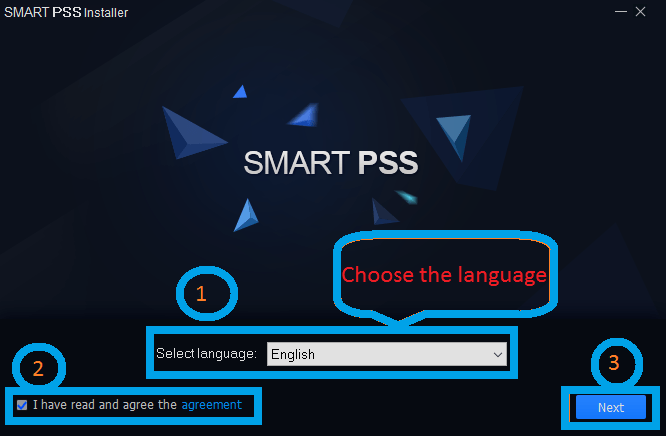
Once the installation is finished, open the application and add your Dahua device.
For a local network installation, the camera or recorder and the computer need to be able to communicate with each other. If the device cannot be found, check the network configuration before assuming that the software itself is broken.
After adding the device, test:
- Live View
- Playback
- Camera status
- Recording status
- Network connection
If everything works, the basic installation is complete.
How to Connect a Dahua DVR or NVR to a PC
There are several ways a Dahua recorder can be accessed from a computer, but a local network is usually the simplest place to start.
Connect the recorder to the network and make sure the PC can reach that network.
Then open the compatible Dahua software and add the recorder using the required device information.
If the recorder does not appear automatically, you may need to enter its network information manually.
Common causes of connection problems include:
- Incorrect IP address
- Wrong username or password
- PC and recorder on different networks
- Firewall restrictions
- Network cable problems
- Router or switch configuration
- Incompatible software
- Firmware/software differences
Changing several settings at once can make troubleshooting harder, so check the network connection first.
Dahua Software System Requirements
There is no single system requirement that applies to every Dahua application.
A lightweight utility such as ConfigTool has different requirements from software displaying many high-resolution camera streams.
Before installing Dahua software on a PC, check the requirements for the exact version you are downloading.
Pay attention to:
- Operating system version
- 64-bit or 32-bit support
- Processor
- RAM
- Graphics capability
- Available storage
- Network connection
- Required permissions
The computer also needs enough resources to handle the camera streams themselves. A system displaying multiple 4K cameras will naturally require more processing and network capacity than one displaying a couple of low-resolution streams.
Common Dahua Software Problems
Dahua Camera Is Not Showing in the Software
First check the network connection. If it is a new IP camera, use an appropriate configuration utility to determine whether the camera is visible on the local network. For detail discussion about Dahua troubleshooting, you can read this complete guide.
ConfigTool Cannot Find the Camera
Make sure the PC and camera are on a reachable network and check whether a firewall or network isolation setting is preventing discovery.
SmartPSS Cannot Connect to the DVR
Check the DVR’s IP address, login credentials, network connection, and compatibility with the software version.
Dahua Software Works but Live View Is Slow
This can happen when the computer or network is struggling with multiple high-resolution streams. Try reducing the number of simultaneous streams or using a lower-resolution sub-stream for multi-camera viewing.
Old SmartPSS Is No Longer Working
Check whether you are using an older SmartPSS release. Dahua has issued notices about discontinued services for certain SmartPSS 2.0 versions and recommends migration to SmartPSS Lite.
Dahua Software Does Not Work on My Mac
Check the exact macOS version and the software’s supported operating systems. A Windows version should not be expected to run natively on macOS.
Frequently Asked Questions
What is the best Dahua software for PC?
For general desktop CCTV management, SmartPSS Lite is one of the main Dahua applications to consider. The right choice still depends on your camera, DVR/NVR model, and what you need the software to do.
What software do I need for a Dahua DVR?
A compatible desktop management application such as SmartPSS Lite may be suitable for supported Dahua DVRs. Check the recorder model before installing it.
What software do I need for a Dahua NVR?
SmartPSS Lite can be used with supported Dahua NVRs for desktop management and monitoring. Compatibility should be confirmed for the particular NVR.
What is Dahua ConfigTool?
ConfigTool is a Dahua utility used for discovering and configuring supported network devices. It is particularly useful during IP camera installation and network setup.
Can I view Dahua cameras on my PC?
Yes. A compatible Dahua desktop application can be used to view supported cameras on a PC. The exact software depends on the camera or recorder.
Can I use Dahua CCTV software on Mac?
Some Dahua solutions may support macOS, but support varies by application and version. Check the current software information before installing.
Is SmartPSS discontinued?
Certain older SmartPSS 2.0 services have been discontinued by Dahua. Dahua has recommended users move to SmartPSS Lite rather than relying on affected older releases.
Is Dahua SmartPSS Lite free?
Dahua provides SmartPSS Lite as a software download for supported systems. Always check the current Dahua software listing and licensing information for the version you intend to use.
Which Dahua software finds the camera IP address?
ConfigTool is the Dahua utility to use when you need to discover compatible devices on a local network and work with their network configuration.
Can Dahua software play recorded video?
Yes. Supported Dahua applications can provide playback functions, while Smart Player can be useful for supported exported Dahua video files.
What is Dahua CMS?
CMS is a general term for centralized surveillance management software. Dahua has several platforms that can perform centralized management, with SmartPSS Lite suited to many standard desktop installations and DSS aimed at more advanced environments.