
Here, you can download NVMS 1000 and learn to install and configure the application. It is available for Windows 7/8/10 and Mac. NVMS is a security surveillance software offered by the TVT brand, which is one of the best CCTV Camera brands all over the world.
NVMS 1000 is the software previously used by the TVT to connect its DVRs. It is highly suitable for those who have an old model of TVT DVR or NVR and want a live view of their cameras on the PC.
It is very good software for Windows to watch your CCTV camera on your computer or Laptop. The NVMS 1000 download CMS is very easy to operate and handle. Just click on the given link and get your NVMS setup.
NVMS Software Information
| Software Name | NVMS 1000 |
| Version | 3.4.6.81018 |
| Size | 81.15 MB |
| Brand | TVT |
| OS Compatible | Windows 7/8/10/11 or Mac |
System Requirements
| Operating System Requirements | Windows 7/8/10/11 or Mac |
| CPU | Dual Core or above |
| RAM | 2 GB |
| HDD | 120 GB |
Download the Right Version as per your device
For those who have purchased a DVR/NVR after 2019
For those who have purchased a DVR/NVR before 2019
For those who have a Mac
The configuration of the NVMS 1000 Software is also quite easy. You just have to download the NVMS 1000 setup from the given links and install it on your PC. After that, put your DVR or NVR on the same network as your computer.
NVMS 1000 Installation and Configuration
Here, we are going to show how to configure the NVMS 1000 Software setup. The process is very easy. You just need to have some computer knowledge.
Step 1
NVMS 1000 configuration from the above-given link as per your need. Open the folder where it has been downloaded. Right-click on the setup file and click on the “Run as Administrator”. Now the system asks for the access grant, then click “yes”. The installation process will start and ask for the next step. Click as per it asking and complete.
Step 2
After finishing the installation of NVMS 1000, an icon will appear on your desktop screen named “NVMS-1000”. This is the shortcut to the software running on your PC. Double-click on that icon, and now a screen will come up asking for the registration. The registration process is only for your PC, not for the DVR/NVR. The user who registers from here is only valid for your computer, not for your CCTV system. Register a user for your NVMS 1000 software.
Step 3
The registration window asks you for a “username” and a “password”. Just put it in the given boxes. Just put username and password, only leaving the other details blank. Just click on the “Save” button. Now the next screen will come up asking for the login details.
Step 4
Insert the username and the password you just created in step 3. Note: This username and password are only valid for the NVMS-1000.
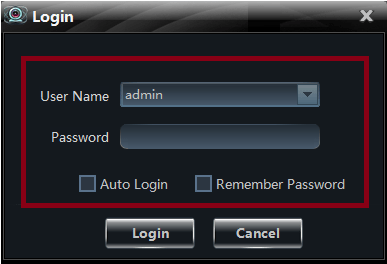
Step 5
Now the next screen will come up with some options. This screen is the control panel of the software. With this screen, you can control all the options according to your needs. For this time click on the “Device”. The Screen is shown below.
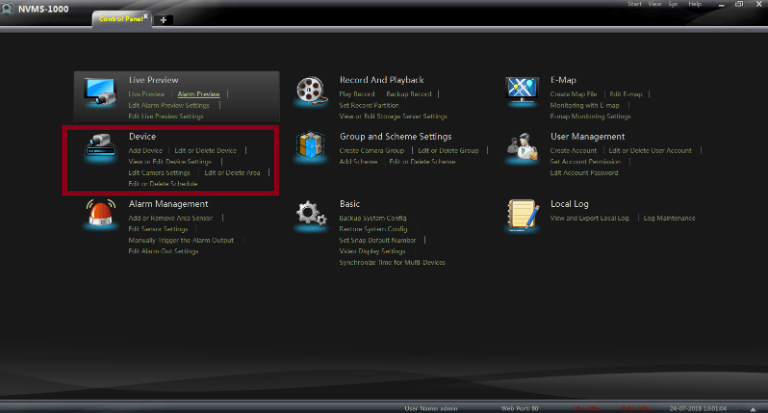
Step 6
After clicking the “Device” option the screen is shown below.
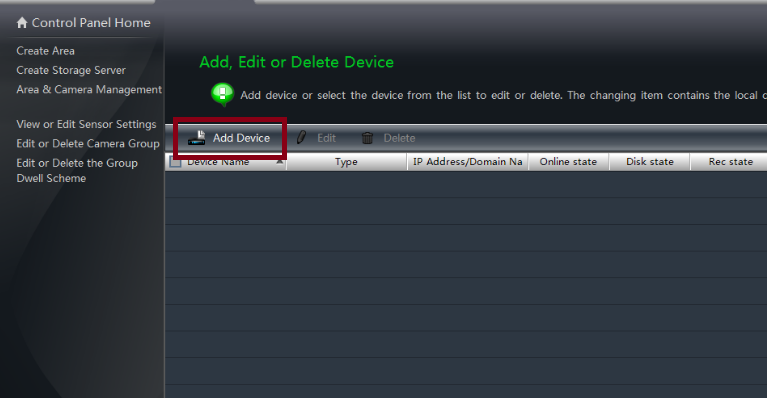
Here an option will come up named “Add Device”. Click on that option. The next screen will come up.
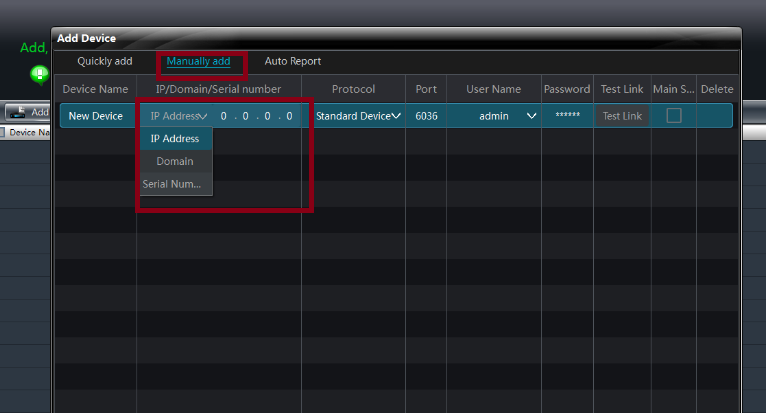
Now you have to add the device to the software. There are three ways to do that. If your device(DVR/NVR) is using a static IP address, then click on the IP address. If the device is using another way, then click accordingly.
Just put all the information into the NVMS-1000 software and click on the save button. Now your software is ready for the live view on your computer. To view, go to the control panel and go to the “live view”.
Here you can find your device name in the left pane. Just double-click on the name of your added device, and the camera will show you.
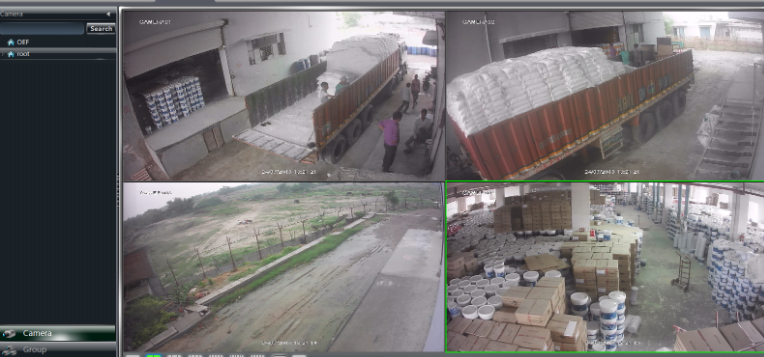
This is all about the NVMS App and the configuration. We hope this post about NVMS 1000 is helpful for you. If you have any queries or suggestions, please feel free to write to us in the comment box below.
Bonus
If you want to download NVMS 1000 for your mobile, then you can also download it for your Android phone and Apple phone as well. The name of the application is Superlive Plus.
Download Superlive Plus for Android
You may also read these posts
Conclusion
The NVMS Application and its installation steps are guided here. This software connects CCTV Devices and makes them remotely accessible. You get your sites from anywhere and monitor them in real-time. If you have queries and suggestions regarding the app or post, please send them in the comment box.
You are valuable to us. We will respond to them.
ThanYou.
Can I see the recording on NVMS 1000?
Yes, You can view the previous recording of cameras anytime on NVMS 1000. Just go to the playback.
Which operating systems are compatible with NVMS 1000?
NVMS 1000 is compatible with Windows 7/8/10/11 and Mac OS operating systems.
Is NVMS 1000 free to use?
Yes, NVMS 1000 is free software provided by its manufacturers for managing their devices.
Can I change the DVR settings with this?
Yes, you can change each and every setting of your DVR with this NVMS
How many DVRs can I live on NVMS?
You can add as many as you want. But my recommendation is 4 maximum for optimizing the system.
Can I rename cameras on this?
Yes, you can. Go to camera settings for this by right-clicking on a particular camera.

request installation guide of NVMS1000 for MacBook
Send you soon sir…
Good Morning Team;
i am looking for DVR and NVR with or without cameras that use the NVMS-1000 software.
Purchase TVT
Good morning Sir,
I’ve download NVMS-1000 software in my PC running on Window 10. Recently I notice there are delays and sometime the display hang for couple of minutes on my monitor. When I check with my handphone running on Android, it display accordingly without delay or hang. So I don’t think any problem with my CCTV system. Could it be the auto update window 10 programmed. Any idea how to solve this. Appreciate for help & Thanks a lot.
No it is all about bandwidth, use giga switches and try to maintain giga network.
Hi,I am not able to view my cctv on my laptop. I dont know how to add our device
Everthing is mention in this post. Download software from link and follow the step.
Hi,
Im trying to download the latest NVMS1000 for Windows 10, but the download doesn’t seem to work, can someone advise why? or provide a link to download pls?
Hi i download ivms 1000 but in device it shows only create device. No add device
Please help me
thank you
hi,
I downloaded software ivms1000 setup is done but online status is showing offline
as the same way i can acess camera on my mobile so any gudience is there to make offline to onlie
please reply me as soon as possible
thank you
if you buy a new setup, Try NVMS lite. Link below
https://cctvdesk.com/nvms-lite-download-pc-windows-mac/
We have a youtube channel also, Please watch videos there.
https://www.youtube.com/watch?v=LtM5aGpRC50
PLease Subscribe to our channel also.
Sir Arsh gud am! what brand of NVR that can support or work with the NVMS-1000? I have other NVR that I cannot add as device to NVMS-1000.
Hi noly, Look NVMS also has the latest version which supports both old and new software NVR. NVMS is software from TVT, You Use TVT NVR. they have also a new Software named NVMS lite.
I have Superlive Plus installed on Android. After the last update I can’t view the cameras from outside. Please help.
How do I reset password if I forgot my password for superadmin
answer the security question, as it asks while installing. If you forget, please re-install the app.
Answer the security question ask while installing, Secondly, you can do, please re-install the app.
Hello, I downloaded and installed the NMVS-1000 s/ware, when registering, I used @ in my password. When I need to log in now, a message shows that log-in failed, nothing to retrieve the password… please help. thanks
When you install this software, security asked. Answer that question and recover. If it is not work then re-install the software.
Hi, I did this as you suggest, still the same message, no option for retrieving password. I think the problem is that the password did register with ‘@’ in the password
Yes. Try to make other combination apart from ‘@’
Can I configure the device to be used by remote pc (like my home pc)? If so how do I add the device?
yes you can, In place of IP address you enter NAT serial number.
I downloaded the Mac version, but every time after I install it and run it, get past the registration, and then try to login it’s not working. Please help
To troubleshoot login issues with the NVMS-1000 software on your Mac:
Check network connection.
Verify login credentials.
Temporarily disable firewall and antivirus.
Update NVMS-1000 software.
Uninstall and reinstall the software.
Contact NVMS-1000 support for further assistance. Support Link http://en.tvt.net.cn/service/feedback203.html
This is excellent work given out for free. Thanks a million
Thank for Comment.
Sir pls guide me to use nvms so I see my locations cctv camera in my one led
Everything is Clearly written in post, if anything not Understand then tell me, i will elaborate.
I have this application and when I go to live preview I can see the video from the camera. However, if I go to playback and select a certain record, I get blank screen, no video is displayed. If I save this record to disk and open it in a video player, again I can see the video just fine. Only in playback mode I cannot see the video. Do you know why is that ?