
V380 camera software can help you view a compatible V380 security camera on a computer. Before downloading a desktop client, check whether your camera uses V380 or V380 Pro so you choose the appropriate software.
This guide explains how to find the Windows download, install the client, and add a camera. Check the publisher’s compatibility information before installing, particularly if you use Windows 11 or macOS.
There are so many stand-alone cameras from this company available on the market. The camera generally runs on your Android. But if you want to see your camera on your PC, then here you can get the V380 Pro camera software download for PC.
Download V380 Software For PC
If you want to view a compatible V380 camera on your computer, start with the software listed on the official V380 support page.
Official download: V380 Software Download
The official page currently labels its V380 Windows download for 64-bit Windows 7, Windows 8 and Windows 10. It does not list Windows 11 or macOS in that desktop-download label, so check the publisher’s current compatibility information before installing it on a different operating system.
Important: V380 and V380 Pro are separate app names. Check the app shown on your phone, the camera documentation or the device label before choosing a desktop client. If your camera uses V380 Pro, see our separate V380 Pro for PC guide.
V380 Camera Software Information
We’ve put together a handy list of key features for this software that we think you’ll find super helpful.
| Software | V380 Camera Software |
|---|---|
| Category | CCTV Camera CMS |
| Developer | Macro-video Technologies |
| V380 Software Version | v 2.0.8 |
| Supported OS | Windows |
| Camera Type | V380 |
| License | Free |
| Internet Required | Yes (for remote viewing) |
| File Type | Windows Installer |
V380 Windows Software Compatibility
The Windows compatibility information can vary by software package. Check the publisher’s download page for the operating systems supported by the current release before installing it.
Do not assume that a Windows client works on Windows 11 or macOS unless the publisher confirms support for that operating system. Also, check whether your camera uses V380 or V380 Pro before choosing a desktop client.
Official download information: V380 Software Download
Before You Install V380 for PC
Check the Windows compatibility information on the publisher’s download page before installing the software. Do not rely on processor, memory, storage, or graphics requirements unless the publisher documents those specifications for the package you are using.
Install V380 on Windows
Download the Windows package from the publisher’s support page and check its file format. If the download is a compressed archive, extract it using a compatible archive utility. Open the extracted folder and follow the installer instructions provided with that package.
The installation screens and available language options may differ by software version. Follow the instructions shown by the version you downloaded.
The publisher’s desktop download information should be checked before assuming that a native macOS client is available. Do not use the Windows installation instructions as Mac instructions.
For Mac, you have to use the APP store to download it.
Configuration of V380 on Windows PC
1. Step – Complete the Registration
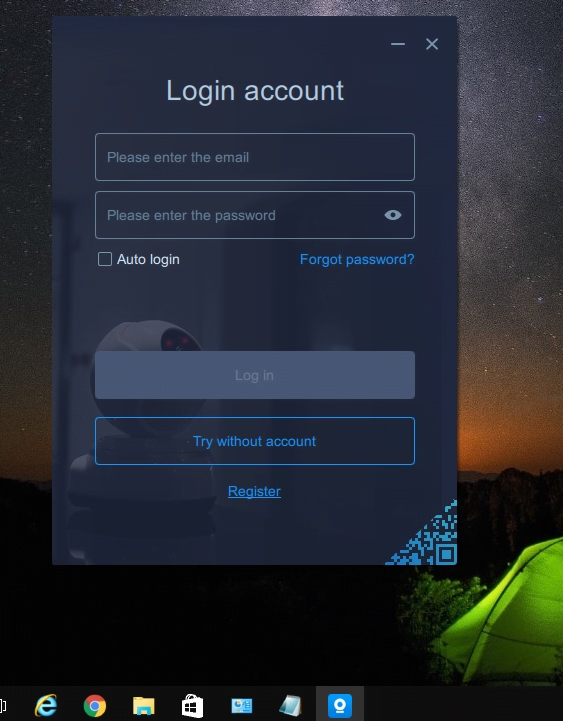
After installation, you will get a shortcut icon on your screen. Double-click on it, and the software will run on your PC. Now click on “Try without an account”. You can also register an account if you want. Just click on “Register” and create an account using your Email. After that, log in with the same account.
2. Step – Adding the Device in V380 Software
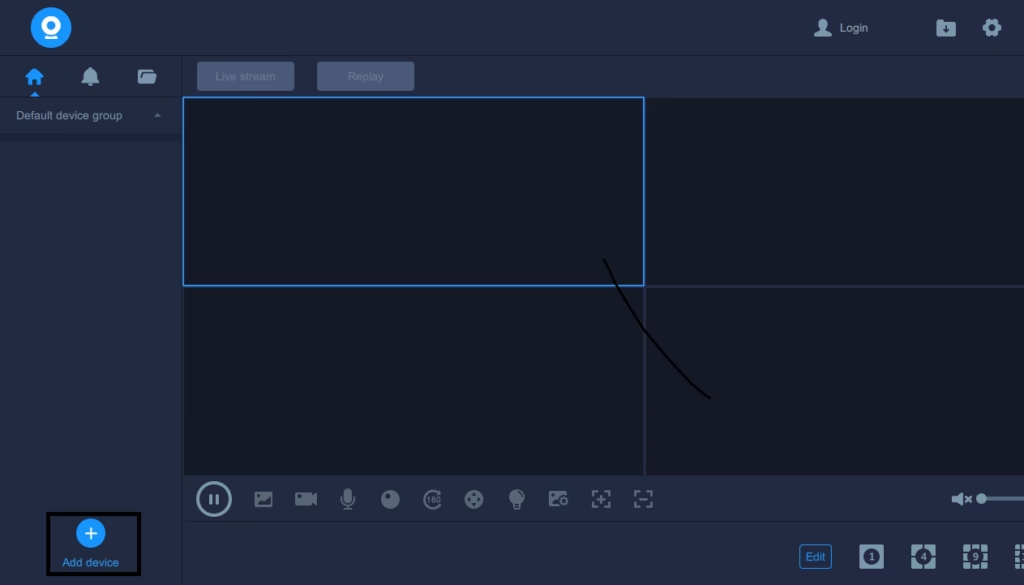
In this step, we are going to add the camera to the device. To do this, click on the Add button on the software screen, which is present in the bottom-left corner. Just click on that button, and then you will get two options. The first one is “Add by LAN searching” and the second one is “Add Manually”. In its CMS, you may choose one option as per your desire.
Option 1 # Add by LAN search.
If you choose CMS for Windows. You will get the next screen saying, “Make sure your camera and your computer are connected to the same router.” This means that if your camera and your PC are using the same local network, otherwise, you have to choose the second option. For this option, click on the search button present in the upper-right corner of your screen.
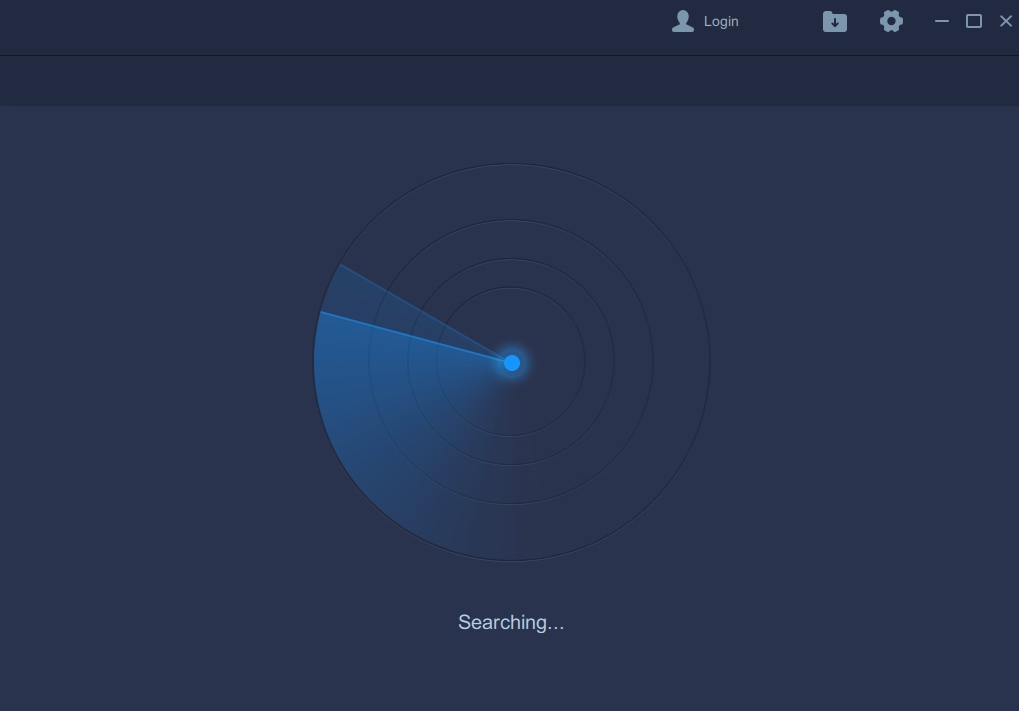
After the search, you can see the device information on your screen. Just click on that device and add it.
Option 2# Add Manually
Choose this option when you are using the internet and are not on the same local network. For this option, you need to have the device ID of the camera. The device ID is present on the camera sticker like the screen below.
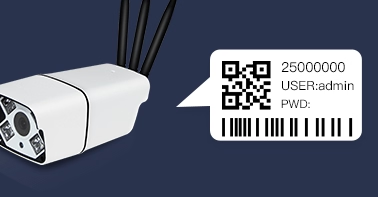
When you get the device ID, move to the software and enter the information.
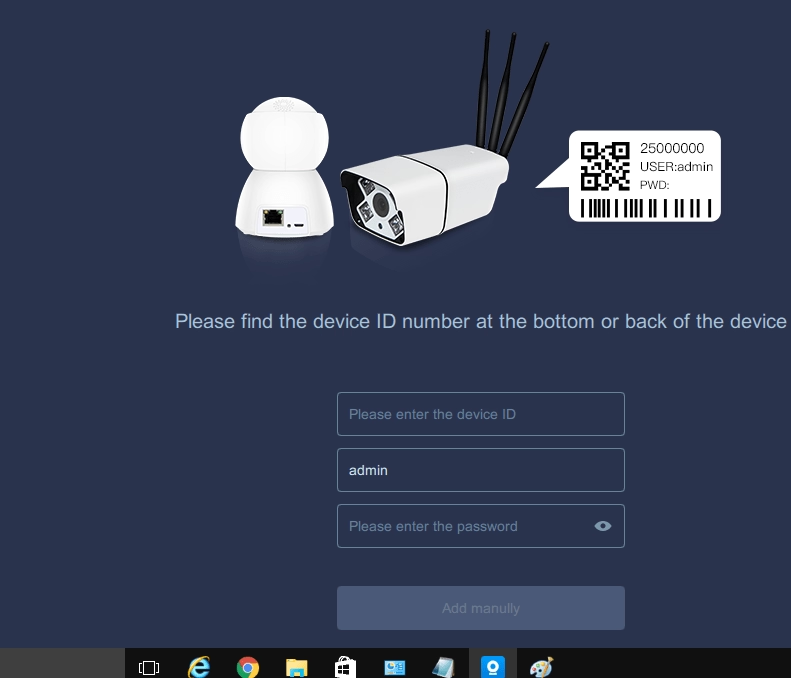
Now fill in all the information and click on the “Add manually” button. Then you can see your camera on the main screen of your V380 camera software download for PC.
3. Step – Change the language.
If you have a language of the V380 software that is not English, then you can change it as described on the screen below.
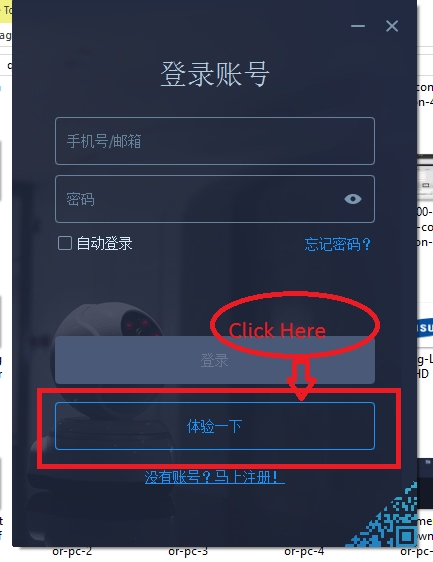
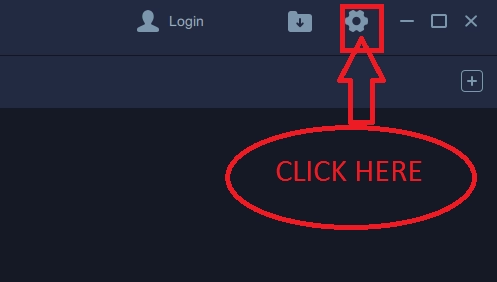
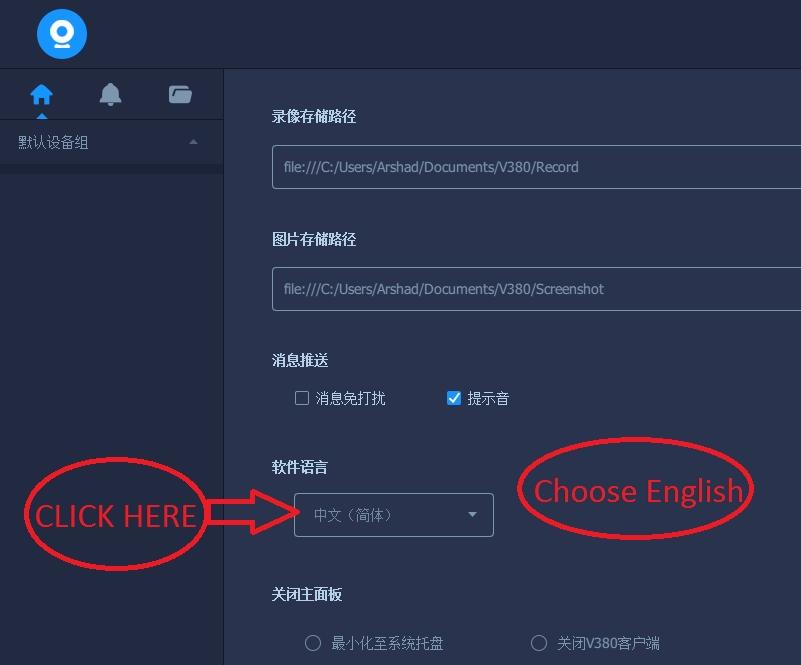
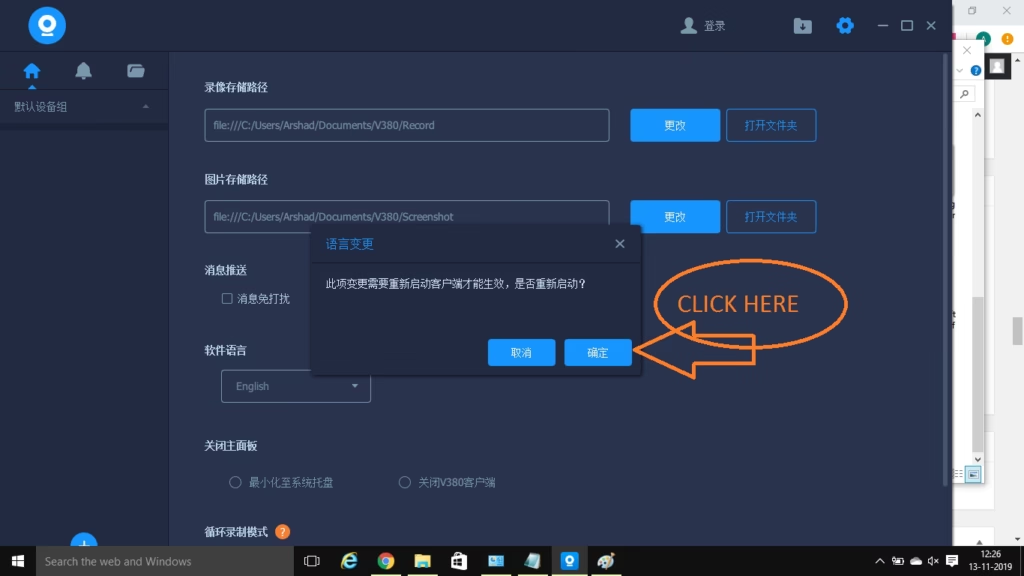
Now you will get “v380 camera software download for PC” in the English, and you are able to use the software as described above.
V380 vs V380 Pro
V380 and V380 Pro are different app names. Check the app installed on your phone or the documentation supplied with your camera before choosing a Windows client.
If your camera uses V380 Pro, read our separate guide: V380 Pro for PC.
Conclusion
The V380 Camera Software Download for PC App is an excellent way to monitor sites from remote locations. It can be configured on Windows PC, Android, and iOS devices. The complete installation and configuration processes are shared with diagrams here.
So this is all about the installation of the V380 Windows software. If you have any queries or suggestions regarding the CCTV camera, then feel free to contact us by commenting in the comment box below.
Is V380 available for Windows?
Yes, V380 is available for Windows. It is also available for Android and iOS devices.
Where can I download V380 software for PC?
Use the official V380 support page to check the available Windows desktop package and its compatibility information.
How do I connect my IP camera to V380 on my PC?
After installing the CMS App on your PC, you have to log in to the app. You will get the homepage of the software. Then go to Add Camera by scanning the QR code. You can also add devices by entering the IP address or serial number.
Where can I find technical support for V380?
You can find technical support from the V380 official website, forum, etc.
Can I customize the settings and preferences in V380?
Yes, you can customize the app. It has given certain options in the settings part. With their help, you can tailor it.
Is V380 the same as V380 Pro?
They are different app names. Check the app installed on your phone or the documentation supplied with your camera before choosing a desktop client. If you use V380 Pro, see our V380 Pro for PC guide.
Can I use V380 on a Mac?
Do not assume that the Windows desktop client is compatible with macOS. Check the publisher’s current support information for your device before attempting installation.

windose 7 32 bit dont work
it works. the problem will be on your pc
no v380 clint app and v380 2.0.4 working properly. but some feachers are not working in this apps and colour is bad. and no mic icon showing
If you are experiencing issues with the V380 client app or V380 2.0.4:
Update the app.
Check app permissions.
Restart the app.
Check device compatibility.
Contact support for assistance.
Hwo can i contact the support
Ask your dealer, from where you purchase the camera. This is global Email: admin@v380.org
phone:+1(484)293-8718
Connection failed, How can I contact the support
Ask your dealer, from where you purchase the camera. This is global Email: admin@v380.org
phone:+1(484)293-8718
This V380 Software, when registering may have spyware that the Chinese can see your video. Just saying.
this is a matter of V380, not us.
live stream is not working in my camera v380
you should check the network settings.
my camra pwd is not shoing how can i add my camera to pc
Connection failed, How can I contact the support
Ask your dealer, from where you purchase the camera. This is global Email: admin@v380.org
phone:+1(484)293-8718
hi, i am able to watch live on my mobile. while i cant watch any thing on laptop. however i can control the camera like moving the camera.
Reset the camera and connect again.
The app is in Chinese even though i selected English to install, how do i change to English?
read the full article. In last, we showed how can you change the language of the software.
Hi, please help after downloading this file, video is not coming.Please suggest for the solution.
you must put settings of your device into the software then the video will come
how to put the settings in the software
Mention in article.
Hi:
Trying to use v380 software on my pc bit cannot identify device number as my barcode doesnt seem to have one,i used one on another 380 camera and that worked fine,any ideas.#
Cheers
Malc
Can esnd barcode if required
Check the barcode from any normal barcode scanner
Hi:
Thanks for reply.On my other v380 cctv camera it worked just fine but this one doesnt seem to have the number on.TRyed emailing company but never get reply.
Many thanks for reply,using the other software that you advised somebody else.At the moment working ok.
Thanks
Malc
i hv install this mutiple times but facing same issue alway ,i hear the voice but live streaming doesnot work
Check the port number of camera
unable to view video in v380 sofware pc
Read the instructions carefully and also make sure that camera model is compatible with this software
Hi:
Thanks for reply.
Used v380 on another camera that broke ok,but when I got this new one the barcode on camera doesnt give me device number so wont register with software.
Emailed for help but not one reply.
Any help appreciated
Malc
you know if it’s possible install some app of v380 to see on a smart tv?
you can launch the same app as your mobile phone
Had the same problem, no device number or barcode on the camera. Connected to my router using a network cable, went into my router to check for connected devices. The camera was displayed, and under device name, it gave me the manufacturer device number. Pain in the arse, but an easy workaround.
you can get serial number of camera in the settings of camera
Does v380 app only support V380 cameras? I have 3 CCTVs on V380 but want to add a doorbell camera. Cant find a V380 one so will one from another manufacturer work?
no you cant
Yes
my network settings are ok, it worked fine until 0 days ago now nothing works anymore – SHIT
Check the port numbers
Please re-install the software and re-configure.
pls help access my ip camera dont have a brand name and there is nothing on the camera too
So connect your camera with mobile app first, in mobile it is synchronise or connect by using voice command. Once it is connected take all the required information and then connect on PC.
I have 2 cameras. One is fixed lens (not rotatable) and the other has a moving lens. In the software, it detects both but I can only view video from the fixed one. I have plugged in the ethernet connection (Cat 6 connection to router) on the moving camera. How can i see it on my PC?
Check whether any camera ask for firmware upgrade. Please upgrade then connect.
my wifi camra show connect failed
Check your network connection and after that you can by resetting the camera
Check internet connection, make sure your phone and camera both connected from same network while configuring
Hello!
I would have used another (V380) instead of a broken camera (V380), but there is no live image under V380 (Win7, 10). Device details are displayed.
The old one worked well.
What could be the problem?
To the previous: The camera transfers the image to the heat!
Both have different firmware. May be your new camera asking for update firmware. Please connect with mobile and update firmware and then connect with PC. Thanks for Question.
Thanks.
The FW version is the same on PC and mobile.
Do one thing reser your camera, an try to connect it again.
Automatically close desktop view , need to restart program & start every camera in computer recording. why dont software works continuously.
Wait for the update.
Hi,
i already installed V380 for Windows and working on 16 cctv/device live streaming. But it’s doesnt normaly working, because after 20minute v380 close by it self at the times. I try open and set on 16 cctv and close by it self again. Please your advice. Thank you
This problem comes when camera Quantity is more. So please wait for update.
Installed v38 for pc. It can detect the cameras and the ID is showing but there is no video. Camera and pc is of different network. I can still view it on my mobile phone
I have the same problem. Do you have any idea or solution? Currently I use V380 on PC in ver: 1.2.3.764 in Windows 11
I see ID’s my camera, but the view is not avaliable. On Android everythink work correct
To address the issue of the camera view not being available on the V380 software on your PC:
1. Check camera compatibility.
2. Update V380 software.
3. Verify camera settings and network connection.
4. Temporarily disable firewall and antivirus software.
5. Contact V380 support for further assistance
Hi,
we have 2 old V380 Cameras and it works perfect with the PC Software. SerialNumber 2XXXX
Now we needed another one which has an SerialNumber Starting with 5XXXX
The new one can connect to mobile phone and Wifi but it cant connect to the PC Software… i get connection failed every time. Any suggestions?
I have the same problem as Dieter says for the V380 camera ID 5xxxx and above. It works with mobile phone but not with PC software version even with the same router. The PC application can detect the camera ID and can be added to the device list (green point status) but when to play the video the “Connect failed” always appear. Same thing happen with HD V380 (1080
pixel) camera
Please wait to try to find a solution and confirm. I am also waiting for the Update.
Is there the update available now ?
I have exactly the same problem you describe. Serial number 5XXX…. Brand new camera, downloaded latest version of software directly from V380. Camera and PC are both connected to same router by ethernet cables so PC sees it just fine. I can view image on a Wifi tablet but constantly says “connect failed” on PC. I am guessing this is a fault of the Win10 PC software and obviously no update has been released as I just downloaded the latest one (17 April 2023). Tried reinstalling, resetting camera, restarting computer, etc… Nothing works. Might try alternative software mentioned by somebody else instead.
please use IP address on your wifi adapter.
hola este pc tiene windows 11 y no conecta la cámara sera ese el problema o habrá otro programa que me ayude gracias
Problem with only Desktop App. (Work fine on Android, with same device ID cameras)
– Adding Manually: Successful
– Tried both with email Login and without
– ID shown on left panel, but LiveStream failed (never-ending circling sign)
Reinstallation &Reconfiguration already tried.
Any suggestion. Thank you.
Wait for the Update, Soon they provide us new desktop app.
Hi:
Anybody willing to send me device number for a V380 software camera.
My barcode on camera does not show number
Cheers
Malc
Nothing is working out from last 2 years.. new models which are out from last 2 years, it wont work on desktop application.. it can only work on iOS as well as android version, also many times both the iOS as well as android version got updated.. and the windows app is same as before and the manufacture is least bothered about windows application..
Yes, You can say, we also rcvd many question like yours. we also wait for the update.
hello! i got problem with this app
everytime i connect my camera, it shows “Connect Failed” it`s already connected to my network, already resetted it but nothing happend…
my camera`s brand is Xiaovv ( V380 pro )
Cheers
To troubleshoot the “Connect Failed” issue with the V380 Camera software:
1. Check network connectivity.
2. Verify camera settings and ensure it’s connected to the correct network.
3. Update the V380 Camera software.
4. Temporarily disable firewall and antivirus software.
Contact customer support for further assistance. Make sure to provide specific details about the problem.
Good morning
My camera ID starts with 68XXXXXX. On Android it works on V380 on PC it doesn’t work. There is a green connection dot but there is a connection error when trying to preview. It doesn’t matter if I check while connected to the same local network or remotely from a different location. Is there any solution for this?
To resolve the connection error with V380 on your PC for a camera with an ID starting with “68XXXXXX”:
Double-check the camera ID for accuracy.
Verify network settings and ensure a stable connection.
Confirm compatibility between the camera model and V380 app on PC.
Update the V380 app to the latest version.
Restart both the PC and camera.
Contact V380 support for further assistance.
Good morning.
My camera ID starts with 68XXXXXX. On Android it works on V380 on PC it doesn’t work. There is a green connection dot but there is a connection error when trying to preview. It doesn’t matter if I check while connected to the same local network or remotely from a different location. Is there any solution for this?
To resolve the connection error with V380 on your PC for a camera with an ID starting with “68XXXXXX”:
Double-check the camera ID for accuracy.
Verify network settings and ensure a stable connection.
Confirm compatibility between the camera model and V380 app on PC.
Update the V380 app to the latest version.
Restart both the PC and camera.
Contact V380 support for further assistance.
Good morning.
My camera ID starts with 68XXXXXX. On Android it works on V380 on PC it doesn’t work. There is a green connection dot but there is a connection error when trying to preview. It doesn’t matter if I check while connected to the same local network or remotely from a different location. Is there any solution for this?
To resolve the connection error with V380 on your PC for a camera with an ID starting with “68XXXXXX”:
Double-check the camera ID for accuracy.
Verify network settings and ensure a stable connection.
Confirm compatibility between the camera model and V380 app on PC.
Update the V380 app to the latest version.
Restart both the PC and camera.
Contact V380 support for further assistance.
how to login in pc using cellphone number
As of my knowledge, the V380 Camera software primarily uses email addresses as login credentials, not cellphone numbers. However, I’ll provide you with the general steps to log in using the software.
1. Install Software: Download and install V380 Camera software on PC.
2. Create Account: Create an account using an email address.
3. Log In: Use your email and password to log in on PC.
4. Access Cameras: After logging in, view cameras remotely on your PC.
how to login in pc using cellphone number?
As of my knowledge, the V380 Camera software primarily uses email addresses as login credentials, not cellphone numbers. However, I’ll provide you with the general steps to log in using the software.
1. Install Software: Download and install V380 Camera software on PC.
2. Create Account: Create an account using an email address.
3. Log In: Use your email and password to log in on PC.
4. Access Cameras: After logging in, view cameras remotely on your PC.
the v380 pro for pc version is not working. it cant even view live view or even replay. while it working well in android phone.
by the way I’m using windows 10. don’t know why it cant access the camera even thou it can log in to my account.
If the V380 Pro app on your Windows 10 PC can log in but can’t access live view or replay:
1.Update the app.
2. Check system requirements.
3. Ensure a stable internet connection.
4. Check firewall and antivirus settings.
5. Confirm camera compatibility.
6. Double-check camera configuration.
7. Update graphics drivers.
8. Reinstall the app.
9. Contact V380 Pro support for help.
Consider trying alternative camera management software if the issue persists.
How can i coonect the support of camera
Ask your dealer, from where you purchase the camera. This is global Email: admin@v380.org
phone:+1(484)293-8718
Hi, my V380 camera has suddenly gone offline, I have tried rebooting and connecting by ethernet cable. The camera goes through the usual boot up sequence with audio messages ending with “Connecting” repeated once but then nothing. The camera shows offline in the app. I have tried pressing the reset button at different times of the boot up and for different times 5 seconds to over a minute – no reset.
Any advice or instructions very welcome, thank you.
My experiences for this case with my several V380 cameras is due to camera power supply adaptor is worn out, either the current or voltage not sufficient anymore. Try to replace it first with your mobile phone adaptor charger. If it works again, it means the power adaptor needs to be replaced.
Hi Nyoman, thank you for your suggestion, I’ve tested the power pack and it is working correctly – 12V DC 2A
Thanks for the reply
Thanks.
Mr. Noman gave the correct answer. Thank you, Noman. Noman, where are you from? Please provide your email ID.
You are welcome. I am from Bali Indonesia. my email nyswatika@gmail.com
ok.
YAS
Thanks for the comment.
Hi Dieter,
Try to download V380 pro for PC App on Windows to from
http://cctvdesk.com/downloads/?filename=V380.2.0.5.zip
Actually previous unofficial version V380.2.0.2 had solved this problem but not posted on cctvdesk.com
ok so use V380.2.0.2.
I really appreciate the detailed information on downloading the V380 camera software! It’s great to see options for both Windows and MAC users. The step-by-step guide was especially helpful. Thanks for sharing!
my camera is added,, but no video appearing